Output audio to DA converters

If you are working with one machine it is relatively straight forward to setup audio output
-
Run a optical cable from the sound card on the Disguise system into your DA convertor
-
Set up the DA to receive sync clock from external device
You should now have 1-8 channels of analogue audio coming out of your DA converter
If you are having a backup (understudy) there are 2 ways to do:
-
Do as described above utilizing a dedicated DA for the master and a dedicated DA for the understudy.
-
Synchronise multiple machines to one DA or a Mixing Desk.
Please note: This presumes your DA has 2 ADAT convertors (RME ADI-8 QS, RME ADI-8 DS, MOTU 2408mk3) i.e. the ability to output 16 channels of analogue audio.
In the scenario of multiple machines and one DA, the audio sample clocks of the master and understudy both needs to be synchronised with the DA convertor.
This is how to do it:
-
Your external DA is going to be the audio sync clock master so make sure the clock source is internal You will probably also have to set your correct sample rate and bit depth.
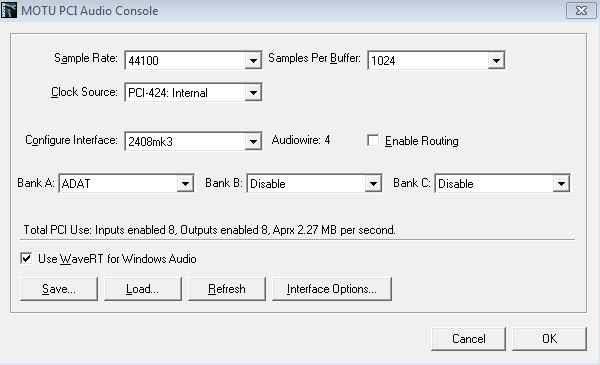
-
Your RME settings in your machine should be set to Clock source: ADAT IN, however it should auto detect if not otherwise is specified.
.png)
-
Both of the optical cables needs to be connected; one is for signal and one is for sync
-
The bottom outlet (grey) is the signal output from the Disguise system and goes into input on the DA convertor.
-
The output on the DA converter (sync) is going into the top input on the Disguise system (Black)
-
You should see in the RME settings menu on the Disguise system that it is receiving sync signal over the optical cable
-
Repeat this step for the understudy as well and you should be good to go
Audio playing inDisguise software/windows but no audio is converted in the DA convertor or very small sporadic instances of audio is coming out of the DA
-
Check the sample rate and bit depth of the entire signal path and make sure they are all set the same parameters (44.1/48 16 bit)
Clicks and pops are heard in the audio from either of the machines
-
The audio sampling is not synced correctly, please check the entire signal path for synchronization e.g. ADAT clock internal on, clock receive ADAT in.
