Option switches can be enabled on a per machine or per project basis.
Advanced machine settings are roughly the same as setting a machine.ini text file containing option preferences prior to r15.
Setting project options is roughly the same as editing the options.ini file in a project folder prior to r15.

-
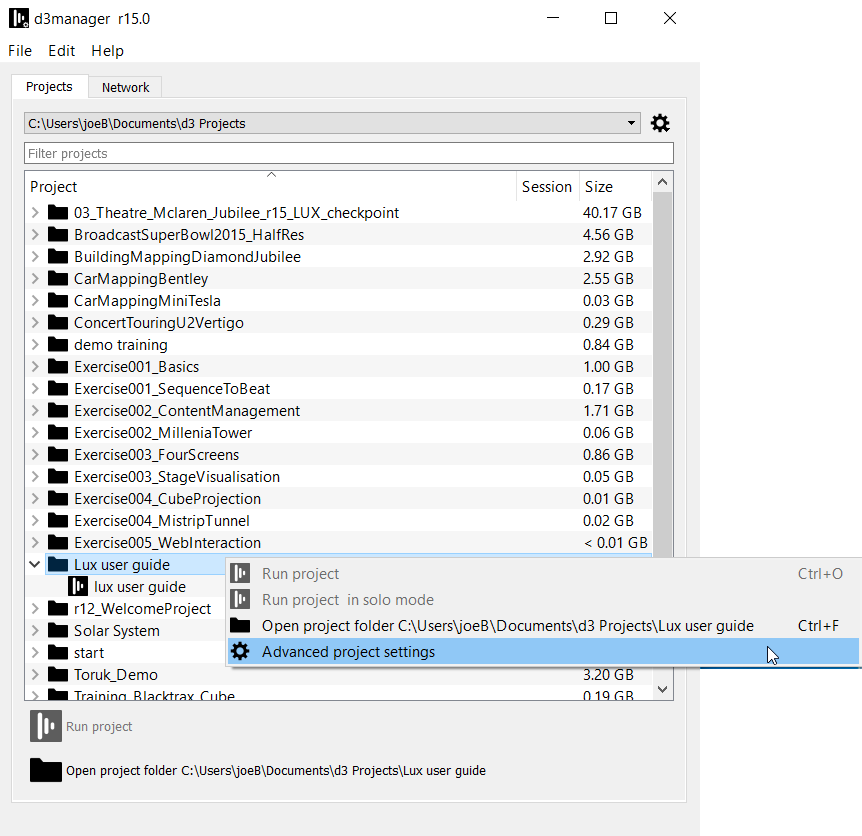
In Manager, right click on a project folder.
Please note: It is important to right click the project folder as options are set per folder, not per .d3 file.
-
Select Advanced project settings from the list.
-
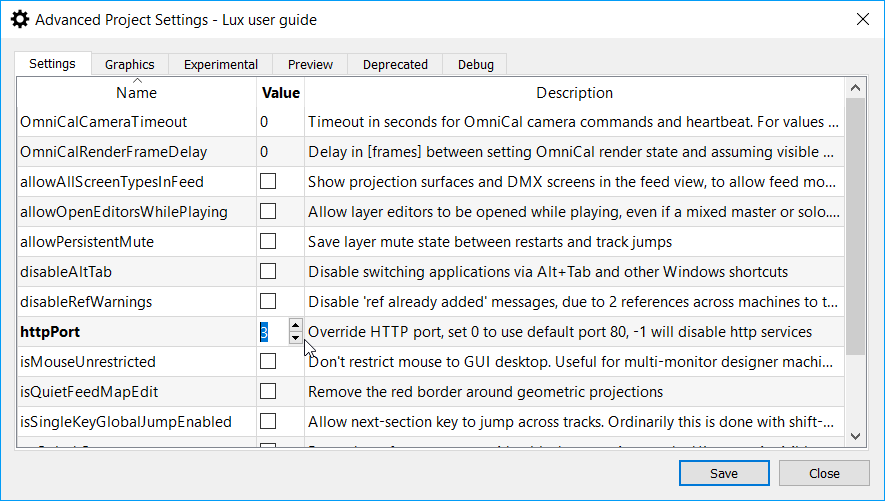
Access the advanced project settings dialog.
-
Select tick boxes to enable boolean options, or double click on integer value options to set them to the desired value.
-
Click Save to close and save the desired settings. Or click Close to close the window without saving.
-
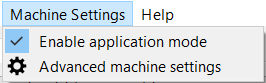
In Manager, expand the Machine Settings menu
-
Left click advanced machine settings to open the editor.
-
Open the advanced machine settings editor.
-
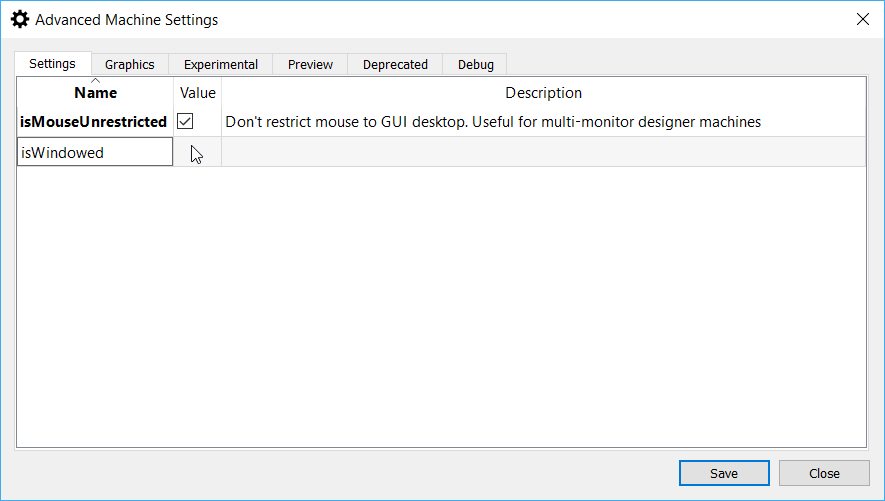
Double click on a name cell.
-
Enter the value from the defined list of settings.
-
Click save to save settings, or close to exit without saving settings.
Under the Machine Settings menu, there is an Enable Application Mode button from r17.2 onwards. This is simply a shortcut to pre-set the following options:
-
isMouseUnrestricted
-
isWindowed
-
maxHeads
-
useApplicationWindow
Application mode allows Disguise software to run in a windowed mode with access to minimise, maximise and close buttons, as well as keeping the windows taskbar visible. This is default on Designer machines, but not rackmount machines.
Warning: Windowed mode should not be used during a running production; doing so can negatively impact your system's performance.
allowAllScreenTypesInFeed
Type: Boolean
Category: Settings
Description: Show projection surfaces and DMX screens in the feed view, to allow feed movies to be written
allowOpenEditorsWhilePlaying
Type: Boolean
Category: Settings
Description: Allow layer editors to be opened while playing, even if a Director that is not dedicated or solo. Off by default to prevent frame drops that can happen when the editor is opened
allowPersistentMute
Type: Boolean
Category: Settings
Description: Save layer mute state between restarts and track jumps
audioLinePcmSize
Type: Integer
Category:Experimental
Description: Increase size of window for FFT in the audio analyser.
audioStreamBufferSize
Type: Integer
Category:Experimental
Description: Set the audio file buffer size. Default is 65536.
audioMinFadeRamp
Type: Integer
Category:Experimental
Description: Minimum audio volume fade ramp in samples.
disableAltTab
Type: Boolean
Category: Settings
Description: Disable switching applications via Alt+Tab and other Windows shortcuts
disableConfirmationDialogue
Type: Boolean
Category: Debug
Description: Suppress confirmation dialog on mass actions
disableFullscreenCheck
Type: Boolean
Category: Graphics
Description: Disable the attempt to maintain fullscreen mode
disableUITransparency
Type: Boolean
Category: Graphics
Description: Turn off transparency on UI windows for extra performance
disableLiveNotchLoading
Type: Boolean
Category: Debug
Description: Disable live reloading of Notch blocks
disableOutputModeHotkeys
Type: Boolean
Category: Settings
Description: Disable toggling of fade down (Backspace) and hold (Alt P)
disableProxyMaker
Type: Boolean
Category: Depreciated
Description: Disables internal proxy maker
disableRefWarnings
Type: Boolean
Category: Settings
Description: Disable 'ref already added' messages, due to 2 references across machines to the same on-disk resource
disableTelnetNotification
Type: Boolean
Category: Settings
Description: Disable the notification for timed out telnet connections
disableVideoclipThumbnailVersions
Type: Boolean
Category: Settings
Description: Hide version numbers underneath video clip thumbnails
displayOverlayMessages
Type: Boolean
Category: Debug
Description: Suppress overlay messages on startup
dynamicSoftEdgeFullRes
Type: Boolean
Category: Graphics
Description: Increase resolution of softedge textures. Increases cost of calculating, improves resulting blend mask
enable10bitDisplay
Type: Boolean
Category: Preview
Description: Enable 10 bit displays
enableGuiFeed
Type: Boolean
Category: Settings
Description: Allows the GUI to be shown as a screen type in the feed. (Useful for outputting the GUI to a head).
enableNotchNDI
Type: Boolean
Category: Settings
Description: Set to allow blocks to use their own internal NDI stream. May cause NDI instability if used alongside d3 NDI streams.
enableMediaStaging
Type: Boolean
Category: Preview
Description: Enable content management
enableSpatialMap
Type: Boolean
Category: Preview
Description: Allow Notch Objects {exposing cameraparams} to be dropped into 3D locations on the stage
enableSLC
Type: Boolean
Category: Preview
Description: Enable support for a larger than 16K canvas
enableProjectorStacking
Type: Boolean
Category: Preview
Description: Enable support for projector stacking calibration
ForceVideoFrameDeliveryCount
Type: Integer
Category: Debug
Description: Force up to this number of video frames to be delivered every output frame.
forceOutputBitDepth
Type: Integer
Category: Debug
Description: Force output window bit-depth (0 = auto, 8 or 10 for bit depth.
enableMultiview
Type:Boolean
Category: Preview
Description: Enable a multi-view style video input. Subdivides a single video input into multiple inputs. Useful for Dedicated Director or editor scenarios
enableNcamDriver
Type:Boolean
Category: Preview
Description: Enable the work-in-progress Ncam driver.
enableTimelineZoomOnScroll
Type:Boolean
Category: Settings
Description: Enable timeline zoom on scroll. Zoom in on layers with scroll wheel, scroll through timeline layers with alt + scroll wheel
GPUFanSpeedPercentOverride
Type: Integer
Category: Debug
Description: Override the fan speed setting for rackmount machines. 1-100%
httpPort
Type: Integer
Category: Settings
Description: Override HTTP port, set 0 to use default port 80, -1 will disable http services
isCefPaintDirtyRectangles
Type: Boolean
Category: Experimental
Description: Copy only dirty rectangles in CEF. May improve WebModule performance
isMouseUnrestricted
Type: Boolean
Category: Settings
Description: Don't restrict mouse to GUI desktop. Useful for multi-monitor designer machines
isNDIEnabled
Type: Boolean
Category: Preview
Description: Enable NewTek NDI video inputs
isQuietFeedMapEdit
Type: Boolean
Category: Settings
Description: Remove the red border around geometric projections
isSingleKeyGlobalJumpEnabled
Type: Boolean
Category: Settings
Description: Allow next-section key to jump across tracks. Ordinarily this is done with shift-key combination
isWindowed
Type: Boolean
Category: Graphics
Description: Run in windowed mode instead of fullscreen. Useful for designer machines
lockMouseWhileOrbiting
Type: Boolean
Category: Settings
Description: Lock mouse to point you're orbiting around the stage
maxHeads
Type: Integer
Category: Graphics
Description: Limit the number of GPU outputs used. Useful for designer machines with multiple monitors
mouseOrbitInvertY
Type: Boolean
Category: Settings
Description: Invert Y mouse movement when orbiting the Camera.
noSplashScreen
Type: Boolean
Category: Settings
Description: Force the software to start with a black screen, in case the UI output is visible to the audience
noStartupStatus
Type: Boolean
Category: Settings
Description: Force the software to start with a black screen, in case the UI output is visible to the audience
notchLogging
Type: Boolean
Category: Debug
Description: Enable logging for Notch blocks. Logfiles will appear in console folder
omniCalCameraTimeout
Type: Integer
Category: Settings
Description: Timeout in seconds for OmniCal camera commands and heartbeat. For values <= 0 a default of 10s is used.
omniCalIgnoreMeasuredCameraIntrinsics
Type: Boolean
Category: Settings
Description: If pre-measured camera intrinsic parameters are ignored in OmniCal initial calibration steps.
omniCalRenderFrameDelay
Type: Integer
Category: Settings
Description: Delay in [frames] between setting OmniCal render state and assuming visible projector output for camera capture. For values <= 0 a default of 5 frames is used.
sessionStartNodeDiscoveryDelay
Type: Integer
Category: Debug
Description: Time to wait [seconds] for discovering sessions on the network
suppressActorsAtStartup
Type: Boolean
Category: Debug
Description: Don't start Actors when starting
useApplicationWindow
Type: Boolean
Category: Settings
Description: Use standard application style window instead of borderless, requires isWindowed to be set.
useApproximateGamma
Type: Boolean
Category: Graphics
Description: Use faster approximate (less accurate) gamma curve formulas
