Grouping layers
When working with large numbers of layers, it is convenient to group related layers together. This reduces the vertical height of the Timeline and makes it easier to move large numbers of layers.
Please note: that to arrow a layer in to an existing group, the layer needs to be on top of the group in the compositing order before arrowing. Arrowing a layer from elsewhere on the timeline will not work.
You can also import and export a group of layers to the current track, or even onto another track in the Timeline. Please read the 'Importing and exporting layers section above for more information on this very useful feature.

-
Hold down the left Shift key and left-click and drag a selection rectangle in the Content Layer section over the layers you want to group.
-
Right-click the highlighted layers to open the Layer menu.
-
Type the name of your group into the group text field and hit Enter. The grouped layers will turn orange.
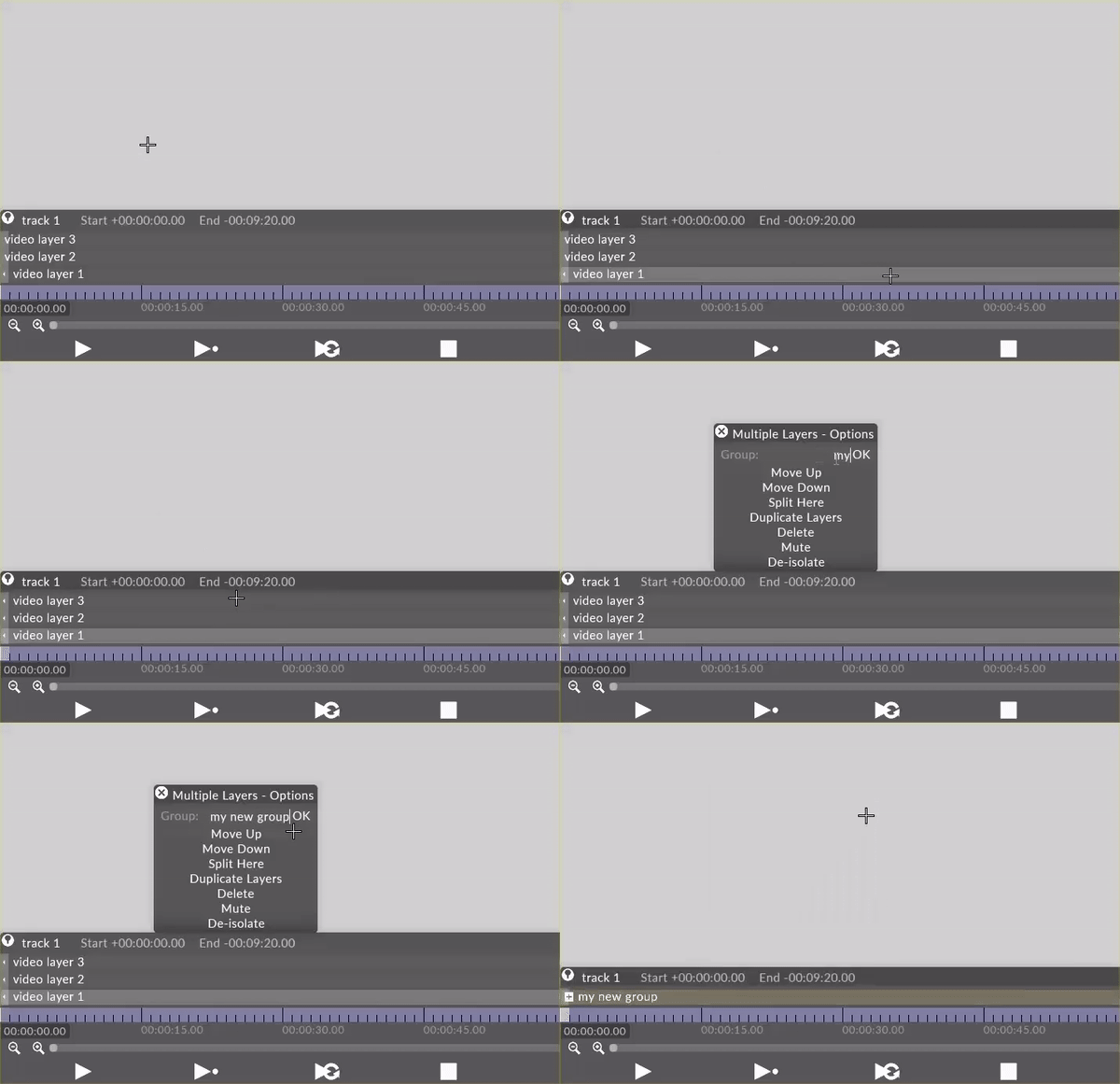
Left-click the + to expand the group layer.
The layers are revealed below the group layer and can be edited in the normal way.
Click the - button on the Group layer.
-
Right-click the Group layer to open the Layer menu.
-
Left-click ungroup.
-
Make sure the group is expanded
-
Right-click on the layer you wish to remove from the group
-
Left-click on Extract
Hold down the Alt key and left-click drag an arrow from the layer to be group, to the group layer.
The layer will be added to the group layer.
